Document scanning software: the whole run, not just the recognition step
Feeding paper into a scanner is the easy part. What costs money is everything around it — deciding where one document ends and the next begins, straightening and cleaning the images, reading enough of each page to name and file it, checking the result, and handing it to whatever system has to hold it. A document capture platform is software that runs that sequence over a batch, unattended, and only asks for a person when something genuinely needs one.
A batch, end to end
- Scan or import. TWAIN and ISIS scanners, watched folders, email or files already on disk — existing images are treated the same as fresh paper.
- Separate. Barcode sheets, patch codes, page counts or a recognised value tell the software where each document starts, so a stack goes through in one pass instead of one job per file.
- Clean up. Deskew, despeckle, crop, drop blank pages and convert to bitonal, because recognition accuracy is mostly decided before the OCR engine sees anything.
- Recognise and index. Full-page OCR makes the document searchable; zone, barcode and AI extraction pull the handful of values that become the filename, the folder path and the database record.
- Validate. Check a value against a database or a rule, and route only the exceptions to a person rather than having someone watch every page.
- File and export. Searchable PDF, TIFF or text into an ECM system, a shared folder, SharePoint or a line-of-business application, with the index data written alongside as CSV, XML or a database row.
Where hybrid OCR fits, and why it matters to the bill
Indexing used to mean a template for every layout and a person fixing what the template missed. The platforms below now read the page with a conventional OCR engine on your own hardware first, then call a large language model only for the fields that engine could not resolve — the handwriting, the unstructured paragraph, the supplier whose invoice nobody has seen before.
That order is the whole argument. Local OCR is fast, predictable and costs nothing per page. Models are excellent at the hard remainder and are billed per token. Running the cheap pass first and the expensive pass only on what is left buys you AI-grade extraction without paying AI prices for the ninety percent of the batch that never needed it — and it keeps the throughput that makes batch scanning worth doing at all.
Two platforms, the same discipline
Both follow that order deliberately. They differ in how they are deployed and priced, not in the principle.
SimpleIndex is the practical, per-workstation route, and it covers the whole run above from one screen. Tesseract or ABBYY FineReader does the full-page pass on your own hardware, which is what makes the document searchable, and only the pages and fields that pass could not handle go on to AWS Textract, a commercial model, or one you run yourself. The AI is entirely optional — switch it off and you have a conventional capture system. Its Workflow Manager, new in version 12, runs scan, recognition, extraction and export as steps that complete without anyone driving them, and the prompt and completion token counts are appended to the text output so the cost of a batch is a number you can read rather than estimate.
ABBYY Vantage is the enterprise route and splits the work the same way. Vantage runs its own OCR and layout analysis first, turning the page into clean, structured text, and only the portion that genuinely needs interpreting is passed to a model — so the model receives less input per request, token consumption falls, and it is reading verified text rather than raw pixels, which is what stops it inventing values. You bring your own model, with native connections for OpenAI, Microsoft Foundry and Google AI Studio and a custom activity for Anthropic Claude, self-hosted or proprietary enterprise models, all on your own credentials. Prompts ship pre-engineered, down to strictness rules telling the model never to infer a value it cannot see. Around that sits a library of more than 150 pre-trained document skills for classification, extraction and validation, built low-code, improving through human-in-the-loop review, and discoverable from RPA platforms such as UiPath, Blue Prism and Automation Anywhere.
Which one, and when
If one team scans batches and files them into an ECM system or a shared folder, a per-workstation platform is almost always the cheaper answer, with the AI there for the forms that defeat a template. If capture is a shared service across departments, with classification, review queues, audit and RPA hand-offs, an enterprise platform earns its licensing. The economics have not changed — automating the run pays for itself in saved data entry and faster retrieval. What has changed is how little configuration it takes to get there.
Not sure which side of that line you are on? Tell us what you scan and we will price the fit, or run a demo on your own documents first.
Document capture platforms
Software that scans a batch of paper, reads what is on each page and files it automatically. These are the platforms we sell and support; every one has a demo you can run on your own documents.
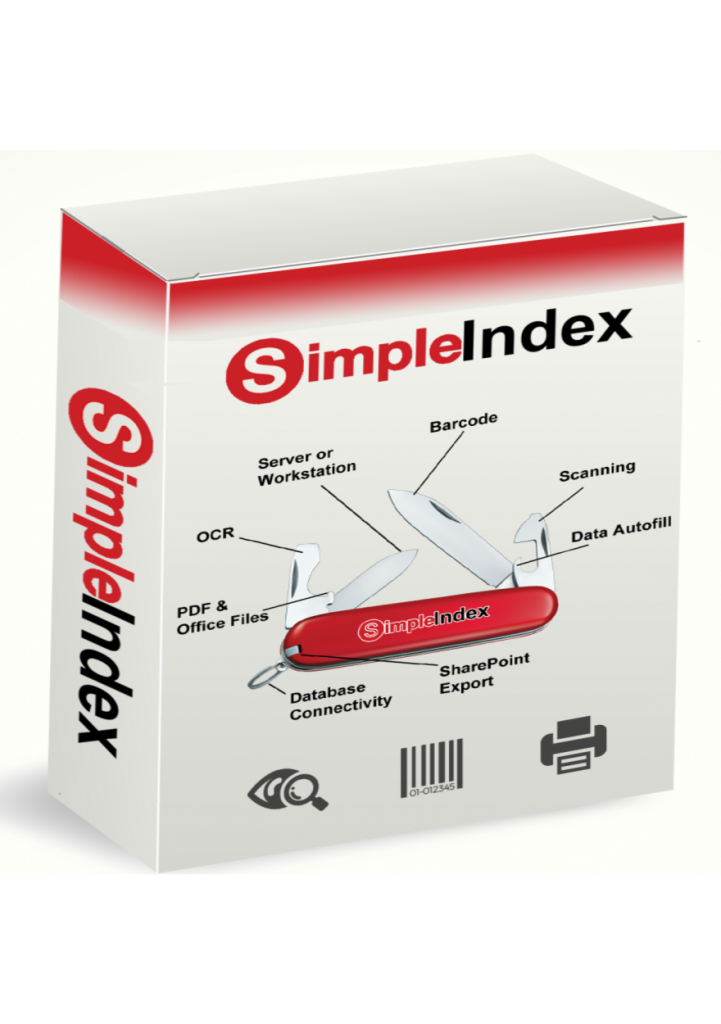
SimpleIndex combines OCR with powerful pattern matching features to extract useful data from OCR text and use it to file documents automatically. Perfect for small to mid-sized businesses that need to digitize many documents at once. Also supports other labor-saving technologies like barcode recognition, zone OCR, and database lookups. The SimpleOCR and Tesseract engines are included, and SimpleIndex Pro adds ABBYY FineReader and cloud AI OCR from AWS, Azure and Google.
OCR results can be saved to text, MS Word or searchable PDF and PDF/A files. Data can be saved to CSV (Excel), any SQL database, embedded in folders and filenames or used as file SharePoint metadata. Integrates with most enterprise document management systems, or use it with SimpleSearch or SimpleView for a simple, low-cost searching solution.
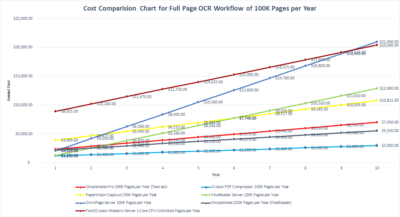
Affordable desktop and server licensing makes SimpleIndex the most cost effective software of its kind!
PaperVision Capture’s fully customizable OCR server uses a machine-based Open Text OCR license to give you incredibly fast full-text OCR capable of handling millions of pages per day without expensive click charges. It can be expanded to add powerful zone OCR and forms processing capabilities. PaperVision Capture was designed for the biggest service bureau scanning operations in the world and tackle any scanning, OCR and data capture job. Its modular licensing based on the number of capture stations gives it the best price/performance ratio for many scenarios.
PaperFlow is Digitech’s single-workstation production scanning software. Set it up on one PC and start scanning straight away, with no database to install, configure or maintain, and a familiar ribbon interface over batch scanning, indexing and export. Editions add unlimited barcode recognition, unlimited full-text OCR, or both. It files straight into PaperVision Enterprise, ImageSilo, another ECM system or any line-of-business application. Where PaperVision Capture is built for distributed, high-volume capture, PaperFlow is the simpler and cheaper choice when one operator scans the batches.
ABBYY FlexiCapture is a powerful data capture and forms processing solution from a world-leading technology vendor. It transforms streams of documents of any structure and complexity into business-ready data. And its award-winning recognition technologies, automatic document classification, plus a highly scalable and customizable architecture, mean that it can help companies and organizations of any size to streamline their business processes, increase efficiency and reduce costs. We would recommend it as the best choice of OCR software for enterprise scale business.
ABBYY Vantage applies the RPA model to data capture software.
Vantage has a marketplace of reusable document “skills” that you can drag-and-drop into OCR projects and RPA workflows to capture data from documents with minimal configuration and specialized knowledge. Select from a huge library of pre-configured templates, or easily train new documents with machine learning.
Kodak Capture Pro helps ensure that business processes run smoothly, reducing costs and enabling innovation that improves customer experience. It truly is the key to overcoming challenges related to secure and reliable capture. And, by letting you share information across your organization, it enables knowledge sharing and collaboration throughout your enterprise.
Quickly and accurately convert large volumes of paper documents into high-quality images your business can use.

IRISPowerscan OCR Server & Central Management distributes document processing activities among multiple users and share a common organization scheme for export digitized documents. It has more powerful zone OCR and automated indexing capabilities compared to other OCR servers, and is priced based on processing speed rather than pages, with unlimited licenses available.
Contact Us for FREE Consultation on Your OCR Project.
Not sure which OCR software you need?
Start with the task you are trying to automate, the file you need out the other end, or the language on the page. Every route below lands on products you can compare, demo and buy.