Email Archiving Solutions
 Email archiving solutions are essential for organizations to manage, store, and retrieve email communications efficiently. These solutions ensure that emails are retained in a secure, tamper-proof format, which is crucial for compliance with various regulatory requirements. For instance, the Sarbanes-Oxley Act (SOX) mandates that businesses retain certain types of records, including emails, for up to seven years. Non-compliance can result in severe penalties, including fines and imprisonment.
Advanced email archiving solutions offer more than just backup and retention; they provide data loss prevention (DLP) capabilities. DLP policies help prevent sensitive data from leaving the corporate network, adding an extra layer of security 1 These solutions also generate audit trails, which are vital for proving compliance during regulatory inspections. Audit trails document all user actions and system activities, ensuring that email retention policies are enforced and that security measures are maintained.
Email Retention Compliance
Email retention compliance is a critical aspect of email management, ensuring that organizations adhere to legal and regulatory requirements. The SEC, for example, requires that certain business records, including emails, be retained for specific periods. Section 802 of the Sarbanes-Oxley Act outlines these retention requirements and the penalties for non-compliance, which can include fines and imprisonment.
To achieve compliance, organizations must implement email archiving solutions that offer fast search and retrieval capabilities. This is particularly important during litigation, where eDiscovery processes can be costly and time-consuming. Efficient email archiving solutions can reduce these costs by providing quick and accurate retrieval of relevant emails.
Best practices for creating an email archiving policy include setting clear retention rules, automating the archiving process, and ensuring that the policy is consistently enforced. Organizations should also consider the specific regulations that apply to their industry, such as HIPAA for healthcare or SEC rules for financial services.
Optical Character Recognition (OCR)
 Optical Character Recognition (OCR) technology plays a pivotal role in enhancing the capabilities of email archiving solutions. OCR allows organizations to extract and search text within images, scanned PDFs, and other non-text-based documents. This is particularly useful for compliance and eDiscovery, as it makes critical information accessible and searchable.
Traditional archiving solutions often struggle with non-text-based files, leaving important information hidden. OCR technology addresses this issue by converting non-text formats into searchable content, ensuring that no vital information is overlooked. This is especially beneficial for organizations that deal with a large volume of scanned documents and images.
SimpleIndex’s OCR feature, for example, automatically converts non-text formats, such as scanned email attachments and images, into searchable content. This enhancement improves search capabilities, allowing IT, legal, and compliance teams to quickly find the information they need within archived emails.
Contact Us for FREE Consultation on Your OCR Project.
Three main approaches to Email Archiving and Compliance
In today’s data driven world, email archiving is a necessity. Organizations must manage massive volumes of emails while ensuring accessibility, security, and alignment with regulatory requirements. There are 3 main approaches to the problem of email retention compliance.
- Email Document Processing
- Cloud Email Archiving
- On-premise “Sunshine” Email Retention
 Email Document Processing
Overview:
Email Document Processing focuses on transforming raw email data into structured, searchable formats for long-term retention. This method converts emails and attachments (e.g., PDFs, images, spreadsheets) into standardized formats like PDF/A, XML, or text files.
Key Features:
- Optical Character Recognition (OCR): Scans and extracts text from non-textual attachments (e.g., scanned documents, images, PDFs) to enable keyword searches.
- Automated Retention Rules: Enforces retention periods aligned with legal standards (e.g., 7 years for financial records under SOX, GDPR compliance for EU data).
- Metadata Preservation: Retains sender/recipient details, timestamps, and attachment types for evidentiary purposes.
- Encryption & Access Controls: Encrypts sensitive data and restricts access via role-based permissions to meet HIPAA or FINRA requirements.
Use Cases:
- Small/Mid-Sized Businesses: Cost-effective compliance without heavy infrastructure.
- Litigation Preparedness: Rapid retrieval of emails during legal disputes.
- Contract Management: Converts scanned agreements into searchable text for compliance tracking.
Challenges:
- Manual configuration for retention policies and system integration.
- Complexity in handling encrypted or non-textual attachments.
Cloud Email Archiving
Overview:
Cloud-based solutions store emails in off-site data centers via providers like Microsoft 365 or Google Workspace. This approach offers scalability, remote accessibility, and automated management.
Key Features:
- Scalable Storage: Dynamically adjusts to data growth with pay-as-you-go pricing.
- Built-In Compliance Tools: Automated retention policies, legal holds, and audit logs streamline regulatory adherence (e.g., GDPR, CCPA).
- Data Residency Compliance: Stores data in region-specific data centers to meet local laws (e.g., EU GDPR requirements).
- Encryption Standards: AES-256 for data at rest and TLS for data in transit, ensuring HIPAA/FISMA alignment.
- Third-Party Certifications: Providers often hold ISO 27001, SOC 2, or FedRAMP certifications for security validation.
- Disaster Recovery: Redundant backups across global data centers ensure business continuity.
Use Cases:
- Remote Workforces: Secure access to emails from anywhere.
- Cost Efficiency: Reduces upfront hardware costs for mid-sized businesses.
- Integration: Seamless compatibility with Outlook, Gmail, and other email clients.
Challenges:
- Vendor dependency on uptime, security, and compliance.
- Potential latency issues due to geographic distance from data centers.
 On-Premise “Sunshine” Email Archiving
Overview:
Sunshine solutions store emails locally on an organization’s own servers, offering full control over hardware, software, and data. This method is favored in highly regulated industries like healthcare, finance or government.
Key Features:
- Full Control Over Infrastructure: Direct management of servers, firewalls, and security protocols.
- Customizable Retention Policies: Tailors rules to industry-specific standards (e.g., HIPAA’s 6-year patient record retention or FISMA for government data).
- Real-Time Access: Low-latency retrieval for immediate compliance or audit needs.
- Setting up Physical Security Measures: Secure server rooms, biometric access, and backup power systems for critical data need to be created and set up by organization. It may be a feature for some organization needs to be compliant, but also may be a challenge to others.
- Audit Trails: Detailed logs track user access and modifications to meet regulatory scrutiny.
- Setting up Software Updates: Regular patches to address vulnerabilities need to be set up by organization. That would require security personal to make decisions on what updates need to be implemented immediately and what may cause harm to your systems.
Use Cases:
- Highly Regulated Industries: Government agencies or banks needing strict data control.
- Data Sovereignty: Storing sensitive data within national borders (e.g., GDPR compliance).
- Custom Workflows: Organizations with unique retention needs (e.g., indefinite storage of historical records).
Challenges:
- High upfront costs for hardware, licenses, and IT staffing.
- Ongoing maintenance burdens, including backups and disaster recovery planning.
Conclusion
Choosing the right email archiving solution depends on organizational needs. All approaches must balance retention rules, security, and accessibility. By aligning key features with business and regulatory priorities, organizations can future-proof their email archives while maintaining operational efficiency.
The Best Solutions for Email Processing and Archiving with OCR options
 Effective email processing and archiving are critical for organizations seeking to manage digital communications efficiently, ensure compliance, and preserve documents long term. Optical Character Recognition (OCR) further enhances this process by converting scanned or image based emails into searchable text. Below are the top tools in this space, each offering unique strengths for document retention and workflow automation.
SimpleIndex
SimpleIndex is a great instrument for the Email processing. It excels at simplifying it with OCR driven text extraction and intuitive tools like email search and incremental downloads. Its incremental download feature allows users to archive only fresh emails from specific folders, reducing redundancy. It makes it one of the best solutions for the Sunshine approaches to email retention. A standout feature is its AI integration, letting users analyze emails for keywords or sentiment before archiving. This combination of OCR, automation, and user friendly controls makes it ideal for teams prioritizing speed and accuracy without technical complexity.
DocuWare
DocuWare is a robust document management system that seamlessly integrates email archiving with OCR. It automatically converts emails into searchable PDFs, organizes them into customizable workflows, and ensures compliance with retention policies. Its user friendly interface and strong security features make it a top choice for mid to large enterprises needing end-to-end control over email and document lifecycle management.
Jatheon
Designed for compliance-driven organizations, Jatheon specializes in archiving emails, social media, and collaboration platforms. Its OCR capabilities enable text based search across scanned or image-heavy emails, while its legal hold and e-discovery tools simplify audit readiness. Ideal for industries like finance or healthcare, Jatheon prioritizes data security and regulatory alignment (e.g., GDPR, HIPAA).
Barracuda
 Barracuda’s email archiving solution pairs OCR with advanced security features like encryption and ransomware protection. It integrates smoothly with Microsoft 365 and Google Workspace, offering automated retention policies and easy search across archived emails. Its focus on scalability and user friendly management makes it a reliable choice for businesses balancing security and accessibility.
arcTitan
arcTitan stands out for its simplicity and affordability. It archives emails into searchable PDF/A formats using OCR, ensuring long term readability even as software evolves. Its cloud based interface and drag-and-drop workflow are beginner friendly, while advanced users appreciate its customizable retention schedules and audit trails. Perfect for small to mid sized businesses needing lightweight yet effective archiving.
Google Vault
For organizations on Google Workspace, Google Vault is the go to for email, chat, and Drive archiving. Its OCR capabilities enable text search in scanned documents, and its e-discovery tools streamline legal requests. Vault’s tight integration with G Suite apps ensures seamless backups and compliance reporting, making it an essential tool for enterprises reliant on Google’s ecosystem.
Amazon AWS
Amazon AWS provides a flexible, cloud-based platform for custom email archiving solutions. Services like Amazon Textract automate OCR for scanned emails, while Amazon S3 offers scalable storage with versioning and lifecycle policies. Users can build tailored workflows using AWS tools, ideal for tech-savvy teams needing full control over their data retention and processing pipelines.
Choosing the right email processing and archiving solution depends on your organization’s size, compliance needs, and technical expertise. SimpleIndex and arcTitan shine for ease of use, while DocuWare and Jatheon cater to complex enterprise requirements. Google Vault and Barracuda excel for cloud-native and security-focused teams, and AWS empowers developers to build custom build systems. Regardless of the tool, OCR remains a cornerstone for ensuring emails are searchable, retrievable, and compliant. Turning raw data into actionable insights.
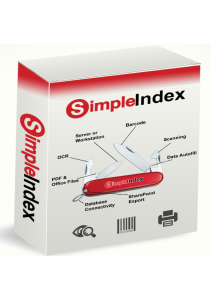
Simple Software’s SimpleIndex has everything you need for document scanning, zone OCR, data validation and output to searchable PDF files, CSV or XML data, document management systems or cloud storage like SharePoint, Box and Google Drive.
The SimpleIndex document management suite includes:
- SimpleIndex comes in Standard, Barcode, OCR and Professional versions, with Server licensing available for unattended processing. FineReader OCR is included with OCR and Pro. Tesseract OCR is included with all versions. Upgraded bar code recognition and scanner drivers are included with Barcode and Pro.
- SimpleView offers folder and file based document management, OCR and editing.
- SimpleSearch uses database indexes for fast, precise document searches.
- SimpleSend automates sending of document files via secure FTP or email.
- SimpleExport converts CSV files into XML or any other text file format using XSLT.
- SimpleCoversheet creates bar code separator sheets to automate scanning and indexing.
Amazon Textract API offers you AWS Cloud Services and good and easy way to implement OCR into your existing AWS RPA. It is a safe bet that the future of OCR and RPA in general will be built on Google Vision API Cloud and Amazon Textract API.
However, it is very far from ready to use product. It would require good programing skills, experience with AWS systems and decent amount of workhours to implement it into your systems. And we at SimpleSoftware have necessary experience are ready to help you with that.

Vision API offers powerful pre-trained machine learning models through REST and RPC APIs. Assign labels to images and quickly classify them into millions of predefined categories. Detect objects and faces, read printed and handwritten text, and build valuable metadata into your image catalog.
Google Vision API offers you Cloud Services and AI technologies of Big G itself, decades of the best AI experience for a reasonable mostly flat rates. It is a safe bet that the future of OCR and RPA in general will be built on Google Vision API Cloud and Amazon Textract.
However, it is very far from ready to use product. It would require good programing skills, experience with Big G systems and decent amount of workhours to implement it into your systems. And we at SimpleSoftware have necessary experience are ready to help you with that.
Share This Story, Choose Your Platform!
Not sure which OCR software you need?
Start with the task you are trying to automate, the file you need out the other end, or the language on the page. Every route below lands on products you can compare, demo and buy.